
Every data team eventually asks the same question. Where should this transformation actually happen?
Not because the answer is hard. It’s because Microsoft Fabric gives you more than one legitimate way to do it, and the two most common tools for moving and shaping data end up looking like they compete with each other.
Dataflow Gen2 and Data pipelines both live inside Fabric’s Data Factory workload. Both can move data. Both show up in the same workspace list. New Fabric users regularly build one when they meant to build the other, then wonder why the result feels clunky.
They’re not competing tools. They’re built for different jobs, and knowing which job you’re actually doing makes the choice obvious.
What Each One Is Actually For
Both tools sit under Fabric’s Data Factory umbrella, but they solve different problems.
Dataflow Gen2
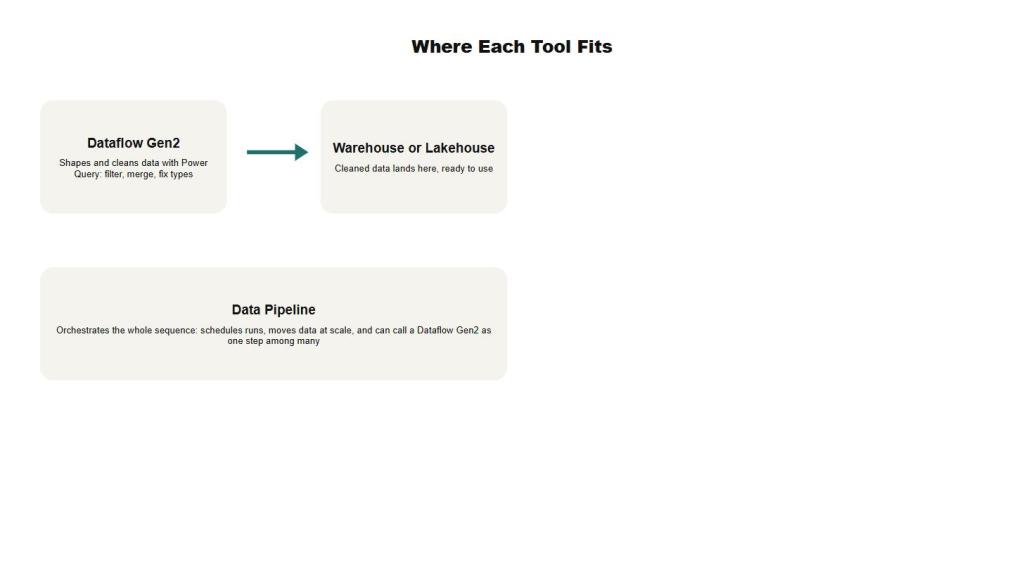
- A visual, Power Query based way to shape data: filter columns, fix types, merge tables, and clean up messy sources before they land anywhere
- Connects to databases, warehouses, lakehouses, and real-time data using the same Power Query experience found in Excel and Power BI
- Autosaves and publishes in the background, and quietly creates Lakehouse and Warehouse items behind the scenes to power its compute
- As of April 2026, every new Dataflow Gen2 item is created with CI/CD and Git integration built in, since the old Gen2 Classic option without it was retired
Data Pipelines
- An orchestration tool for moving data and coordinating work at scale, with a low-code, drag and drop designer
- Supports control flow like loops and conditionals, so you can build workflows that branch, retry, and depend on each other
- Can trigger and schedule work, including calling a Dataflow Gen2 as just one activity in a larger sequence
- For teams that prefer code over a canvas, Fabric Data Factory also integrates with Apache Airflow to define orchestration as Python DAGs
ETL or ELT: The Real Decision Underneath
Underneath the tool choice is an older question: do you transform data before you load it, or after? ETL cleans and reshapes data on the way in, which is what Dataflow Gen2 is built for. ELT loads raw data first and transforms it later, closer to where it’s stored, which is the pattern Data pipelines support when they move data quickly and leave the heavy transformation to a warehouse, lakehouse, or notebook downstream.
Neither approach is universally better. It depends on where you want the transformation logic to live and who needs to maintain it.
A Kitchen Makes This Easier to Picture
Picture a busy restaurant kitchen. A prep cook stands at a station chopping vegetables, portioning proteins, and getting every ingredient into exactly the shape a recipe calls for. That’s Dataflow Gen2: hands-on, detail focused, working with the ingredients themselves.
The expediter stands at the pass, calling out tickets, timing when each station starts cooking, and making sure five different dishes for one table arrive together instead of whenever they happen to finish. That’s a Data pipeline. It doesn’t chop anything itself. It decides what happens, in what order, and what to do if something falls behind.
A busy kitchen needs both roles. So does most real Fabric data estate.
They’re Not Actually Competing
A Data pipeline can call a Dataflow Gen2 as one step in a longer sequence. That’s the setup a lot of production Fabric workloads actually use: a pipeline handles scheduling, retries, and moving data between stages, and one of those stages hands off to a Dataflow Gen2 for the detailed cleanup work. The question usually isn’t which tool wins. It’s which one owns which piece of the job.
Which Should You Reach For First?
Reach for Dataflow Gen2 when
- The work is mostly shaping and cleaning data: renaming columns, fixing types, merging tables, removing duplicates
- You want a visual, Power Query style experience that business analysts can read without learning a new tool
- The transformation logic itself is the complicated part, not the sequencing around it
Reach for a Data Pipeline when
- You need to move large volumes of data quickly and let compute downstream handle transformation
- The job involves coordinating multiple steps, systems, or conditional logic rather than one clean transformation
- You need scheduling, monitoring, and retry behavior around the whole process, not just one piece of it
Why the Distinction Matters
Teams that skip this decision usually end up with one oversized Dataflow trying to do orchestration it was never designed for, or a pipeline full of copy activities quietly doing transformation work that would be far easier to read and maintain in Power Query. Neither failure shows up on day one. Both show up months later when someone has to debug it.
As Fabric keeps adding CI/CD support, Copilot assistance, and tighter integration between its workloads, the line between these tools will probably keep blurring at the edges. The underlying split, shaping data versus orchestrating work, is still the right way to think about it, and it’s likely to outlast whatever the interfaces look like next.